Conditional Address Fields on Signup Page
In case of you want to ask user for address fields only in case he choose some option (in this tutorial we use "Is Company?" field for it) you need to do the following:
Add new Additional User Field
Section titled “Add new Additional User Field”aMember CP -> Configuration -> Add User Field
choose Display Type for this field as Single Checkbox
Edit Signup Form
Section titled “Edit Signup Form”aMember CP -> Configuration -> Forms Editor
- add field "Is Company?" to your signup form
- add Fieldset block
- add Address Information block to this Fieldset
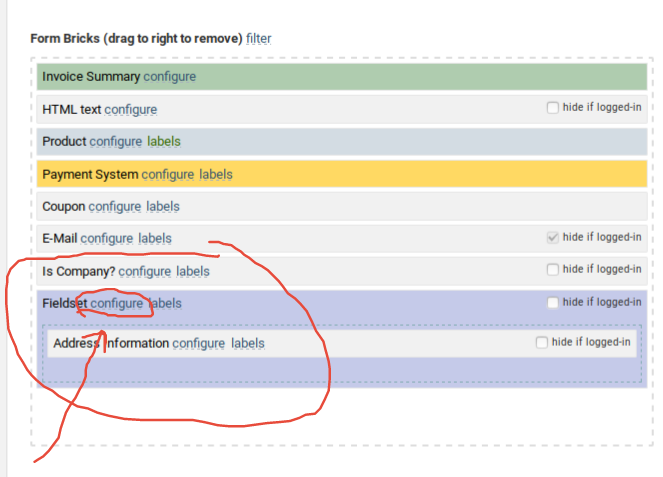
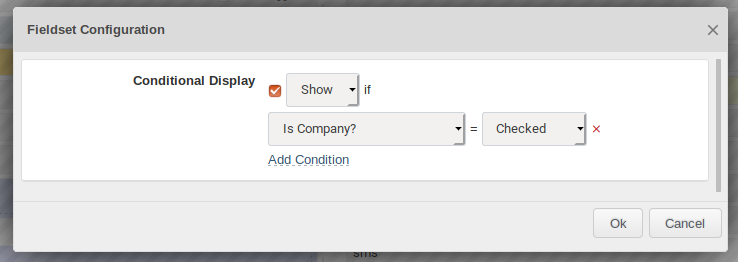
within Fieldset configuration make it conditional and display only if field "Is Company?" is checked.
within Address Information block configuration enable option Hide Brick Title and make all fields not required.
Save new form configuration and then check it to be sure it works as you need.
Copyright © 2002–2026 www.amember.com. All Rights Reserved.